Huawei HarmonyOS 7 for PC Pollen Beta Now Officially Rolling Out
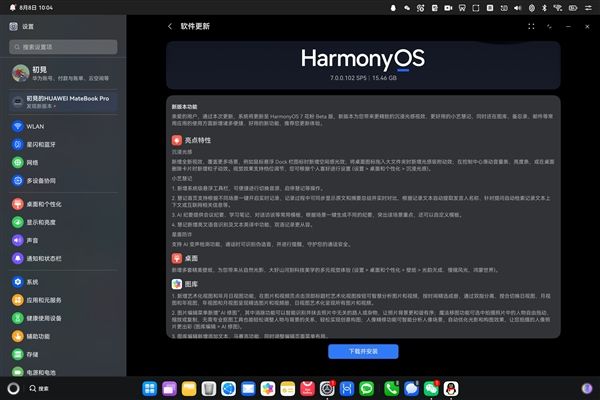
Huawei HarmonyOS Computer HarmonyOS 7 Pollen Beta version has been officially rolled out, with version number 7.0.0.102 SP5 and a complete installation package size of 15.46GB. This update adds a large number of practical functions in visual animation, AI office, image editing, privacy security, system tools, and more.
HUAWEI MateBook Fold Extraordinary Master, HUAWEI MateBook Pro, and HUAWEI MateBook 14 HarmonyOS Edition are the three models that can participate in the upgrade. The system baseline version must reach 6.1.0.130SP15 or above to apply.
The update changelog is as follows:
Immersive Light Effects
New visual effects have been added, covering more scenarios. For example, a spatial light effect is added when the mouse hovers over Dock bar icons; a light-sensing snap animation is added when dragging desktop icons into a large folder; particle animations are added when sliding the volume bar or brightness bar in the Control Center, or when deleting cards on the desktop. Visual effects support level adjustment, and you can set them according to your personal preferences (Settings > Desktop and Personalization > Immersive Light Effects).
Xiaoyi Smart Notes
A system-level floating toolbar has been added, allowing convenient operations such as switching audio sources and starting/stopping Smart Notes.
The Smart Notes home page supports one-click real-time recording based on different scenarios. During recording, the original text and summary are displayed simultaneously for real-time comparison, speaker names are automatically extracted from the recording text, and the recording text context or related internet information is automatically retrieved for questions.
AI Meeting Minutes provides common templates such as meeting minutes, study notes, and conversation interviews. It generates different minutes with one click based on the scenario, highlighting the key points of that scenario, and templates can also be customized.
Smart Notes adds English speech recognition and English-to-Chinese text translation, making bilingual recording more effortless.
Star Shield Anti-Fraud
Supports AI voice-changing detection, which identifies forged voices during calls and provides reminders to safeguard your call security.
Desktop
Adds multiple sets of exquisite wallpapers, bringing you a diverse visual experience from natural light and shadow, magnificent landscapes, to technological aesthetics (Settings > Desktop and Personalization > Wallpaper > Natural Radiance, Slow-Motion Scenery, HarmonyOS World).
Gallery
Adds artistic view and year/month/day view features. On the Images and Videos pages, clicking the Artistic View button in the top title bar intelligently analyzes images and videos and curates them into albums by time. Switch between day view, month view, and year view by spreading or pinching two fingers. Year view and month view present curated image and video albums, while day view artistically presents all images and videos.
The image editing menu adds “AI Retouching”, in which the Erase function intelligently identifies and removes irrelevant passers-by or clutter from photos, making the photo background more harmonious and orderly; the Magic Move function allows you to select people in photos and freely drag, scale, or copy them. Without professional cutout tools, you can easily adjust the relationship between people and the background to achieve creative compositions; the Portrait Refinement function intelligently analyzes portrait scenes and automatically optimizes lighting and composition effects, making your portrait photos more outstanding (Gallery Edit > AI Retouching).
Gallery editing adds Add Text and Mosaic functions, and the editing page menu layout has been adjusted.
The portrait album adds a group photo album, where group photos are automatically categorized into albums for quick viewing.
Privacy and Security
Supports HarmonyOS Passkey passwordless authentication. After authentication is completed, you can obtain a system-level passkey. Through secure credentials such as fingerprint recognition, you can easily complete identity authentication to log in to websites or applications without entering cumbersome account passwords. Seamless cross-device authentication login is also supported, bringing you an unprecedented convenient and secure experience (requires websites and applications to support Passkey).
System
Adds a clipboard history feature. Press “HarmonyOS key + V” to bring up the clipboard history and view recently copied text and images for quick pasting.
Wireless screen projection supports Extended mode, allowing you to extend the computer’s content to another screen and display different content on dual screens for more efficient work and study.
Adds a multi-image print function, which supports arranging and printing multiple images on a single sheet of paper.
Notes
To-do time reminders support custom repeat cycles. To-dos can be automatically reminded in cycles, eliminating repeated creation and simplifying complexity for a smarter life (Notes > All To-dos > “+” to create a to-do > Time Reminder > Repeat > Custom).
On the sort/edit page, to-dos support long-press and drag to sort, making operations simpler and order adjustment more flexible (To-dos > Four-dot settings icon > Sort/Edit).
Supports recognizing schedule information in emails and syncing it to the calendar, saving time and effort.
Email supports automatic attachment download and one-click download of all attachments.
Related Articles
Huawei phone users have finally got what they've been waiting for! The HarmonyOS trial beta version of NetEase Cloud Music is now available.
about 4 hours ago
The price after discounts is 6544 yuan! Lenovo ThinkPad E14 2026 laptop is now available: Core 5 320 + 512GB
about 5 hours ago