Huawei HarmonyOS 7 Pollen Beta Version Push: New visuals added, supports AI voice change detection

recently, Huawei HarmonyOS 7 Pollen Beta version has officially opened for registration, covering 41 models including the Mate 80 series, Mate 70 series, and Pura 90 series.
After the registration started, Huawei quickly pushed the HarmonyOS 7 Pollen Beta update to users who passed the review, with the installation package size being approximately 10GB.
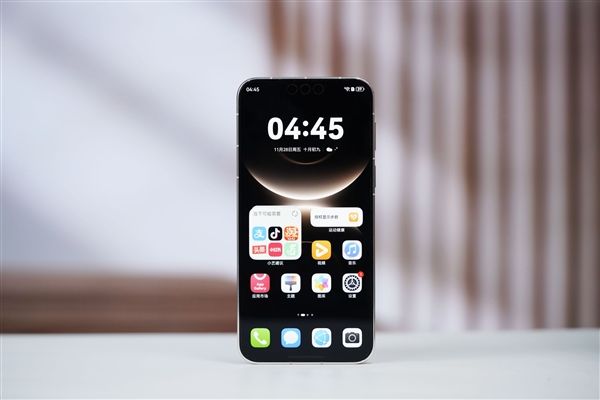
According to the update log, this upgrade mainly focuses on new visual effects, security protection, desktop interaction, and privacy protection.
In terms of visual experience, HarmonyOS 7 adds a new immersive light effect and covers more system scenarios, for example, when dragging a desktop icon into a large folder or adjusting volume in the control center, richer dynamic visual feedback can be presented.
At the same time, the immersive light effect also supports level adjustment. Users can go to "Settings > Desktop and Personalization > Immersive Light Effect" to adjust the display effect according to personal preferences.
In terms of security capabilities, Huawei's new Star Shield anti-fraud feature adds an AI voice change detection function, which can identify forged voices during calls and issue risk reminders in a timely manner, further enhancing call security.
In addition, the system also supports identifying risky QR codes and automatically blocking them, while also detecting fraudulent webpage content and issuing timely warnings when fraud risks are found.
In terms of privacy protection, the app lock adds a "Only owner's gaze displays card content" feature.
Only when the owner looks at the screen will the card content of locked apps be displayed; when non-owners or multiple people are detected looking, the relevant content will be automatically hidden.
Desktop interaction has also been optimized. Users can long-press a desktop folder and select "Dissolve" to instantly return the apps in the folder to the desktop with one tap.
In addition, the font size adjustment function for desktop icons has been simplified. Users only need to pinch two fingers on the desktop and select "Icons" to quickly adjust the icon and font size.
It is understood that this update also optimizes system stability in some scenarios.
Related Articles
Huawei phone users have finally got what they've been waiting for! The HarmonyOS trial beta version of NetEase Cloud Music is now available.
about 4 hours ago
The price after discounts is 6544 yuan! Lenovo ThinkPad E14 2026 laptop is now available: Core 5 320 + 512GB
about 5 hours ago